The problem passwords could never solve
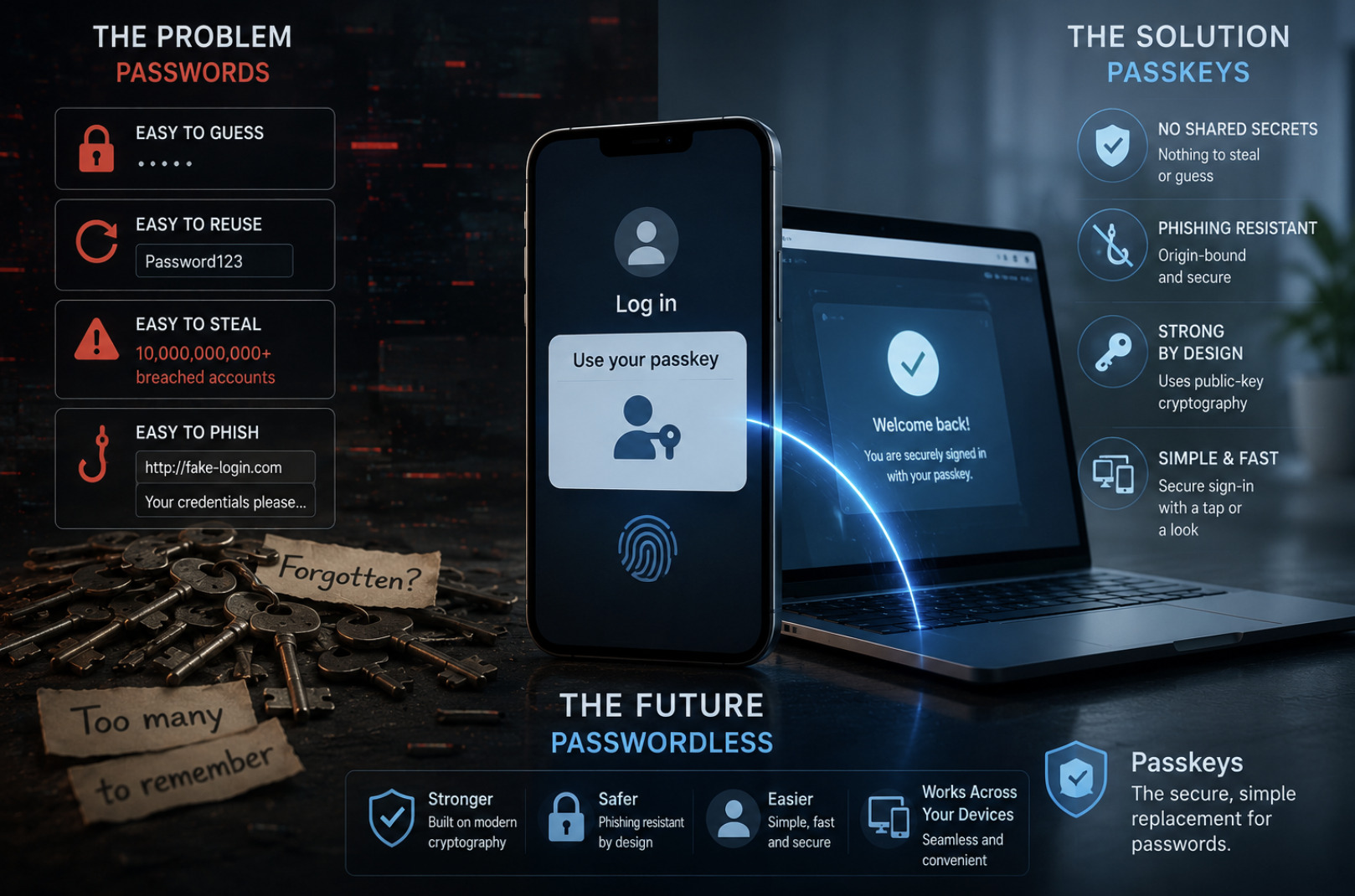
To understand why passkeys matter, you have to appreciate how fundamentally broken passwords are — not through carelessness, but by design. A password is a shared secret: the same string that you know is also stored, in some form, by the service you log into. That shared nature is the root of nearly every failure. If the service is breached, the secret leaks. If you reuse it, one leak compromises many accounts. If someone tricks you into typing it on a fake page, they now have it too.
Decades of advice — longer passwords, special characters, frequent changes — treated the symptoms while leaving the disease untouched. Even two-factor authentication, a genuine improvement, mostly bolts a second step onto a broken foundation, and some forms of it can still be phished. The uncomfortable truth is that as long as authentication depends on a human remembering and typing a secret that a machine also stores, the system will remain vulnerable. Passkeys attack that root cause directly.
What a passkey actually is
A passkey replaces the shared secret with something far stronger: public-key cryptography. Instead of a single password known by both sides, a passkey is a pair of mathematically linked cryptographic keys. When you create a passkey for a website, your device generates this pair. One key — the private key — never leaves your device. The other — the public key — is handed to the website and stored there.
The elegance is in the asymmetry. The public key, which is all the website keeps, is useless to an attacker; it cannot be used to log in or reverse-engineer the private key. The private key, which can log in, never leaves your device and is never transmitted anywhere. There is simply no shared secret to steal. When a service using passkeys is breached, the attackers walk away with a pile of public keys that grant them nothing. That single architectural change eliminates the entire category of password-database breaches.
How logging in with a passkey works
In practice, using a passkey feels almost too simple, which is part of the point. When you go to log in, the website sends your device a challenge — a random piece of data. Your device uses the private key to sign that challenge, proving it possesses the key, and sends the signature back. The website verifies the signature using the public key it holds. If it checks out, you are in. The private key itself is never revealed in the exchange.
Crucially, this cryptographic work is unlocked by something local and convenient: your device's own biometric or PIN — a fingerprint, a face scan, or the screen-lock code. That local check authorises the device to use the private key, but the biometric data never leaves your device either. From your perspective, logging in is nothing more than glancing at your phone or touching a sensor. Behind that simple gesture, a robust cryptographic handshake has taken place, with no secret typed, transmitted, or stored anywhere it could be stolen.
Why passkeys defeat phishing
The most important security advantage of passkeys is one users never see: they are inherently resistant to phishing, the attack that defeats even careful people. Phishing works because a password is portable — if a fake site convinces you to type it, that same password works on the real site. Passkeys break this completely, because a passkey is cryptographically bound to the specific website it was created for.
When you try to use a passkey, your device checks the exact domain making the request. If a fraudulent look-alike site asks your device to authenticate, the domains do not match, and the device simply will not produce a signature. There is nothing for you to get wrong, no judgement call about whether a page looks legitimate. The protection is automatic and built into the protocol. This is a profound shift: instead of relying on humans to spot fakes — something we are demonstrably bad at — the system refuses to be fooled in the first place.
The convenience question: syncing and devices
A reasonable worry is what happens if you lose the device that holds your private key. Early passwordless systems stumbled here, but the modern approach solves it through synchronisation. Passkeys created on your devices can be securely backed up and synced across your ecosystem through your platform account, encrypted end to end. Lose your phone, sign in to a new one, and your passkeys come with you.
This syncing is what makes passkeys practical for ordinary people rather than just security enthusiasts. You can also use a passkey stored on your phone to log in on a nearby computer, with the two devices communicating securely over a short-range connection to confirm proximity. The result is an experience that is usually more convenient than passwords — no typing, no resets, no password manager to wrestle with — while being dramatically more secure. The old trade-off, where better security meant more friction, is reversed.
What the transition looks like
Passkeys are not arriving all at once; they are rolling out gradually across the services people use every day, backed by an industry-wide standard developed by the major platform and browser makers. That shared standard is why passkeys work across different devices and companies rather than locking you into one vendor. Many large services now offer passkeys as an option, and a growing number encourage them as the default.
For most people, the sensible approach is to adopt passkeys wherever they are offered, starting with the most important accounts — email, banking, and the platform account that anchors everything else. During the transition, passwords will linger as a fallback, and that is fine. The direction of travel is clear, though: the password is being demoted from the front door to a dusty spare key, and eventually many services will drop it entirely. Getting comfortable with passkeys now means being ready for the passwordless future rather than scrambling to catch up.
Conclusion
Passkeys represent the most significant change to how we log in since the password itself. By replacing a shared, stealable secret with public-key cryptography, they eliminate password-database breaches, defeat phishing automatically, and — thanks to biometrics and syncing — do it all while being easier to use than what came before. The technology is mature, standardised across the industry, and already available on the services that matter most. The password's sixty-year reign is finally ending, and for once the replacement is not just different but genuinely, structurally better. The smart move is to start using passkeys today.